Find your TikTok account from what you still remember
An email address or a phone number is usually enough: TikTok’s recovery screen shows the account and every way to log in to it. No username? No problem.
Profile checkerNewcheck a TikTok profile by usernameStart here
Pick what you still remember
On the login screen tap Help → Recover your account, enter the username or email and tap Search.
You’ll see the account’s profile picture and where TikTok can send a code.
Then reset the passwordEnter it on the same recovery screen. TikTok says this shows all login methods linked to the account — including Google, Facebook or Apple.
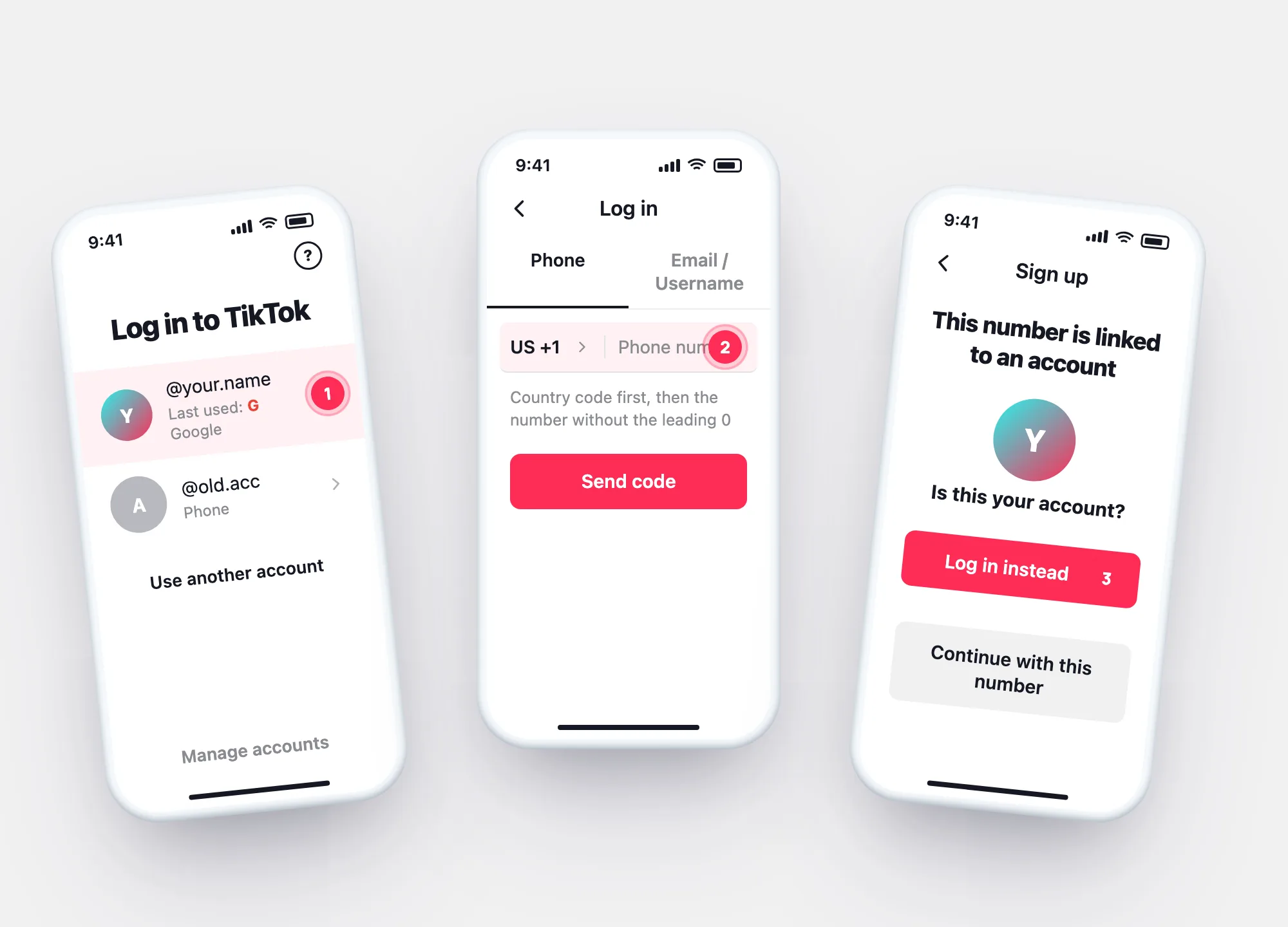
Social login helpLog in with Use phone / email / username and the number: you land in the account it’s linked to.
Signing up with that number instead shows the linked account’s profile picture. Tap Log in instead — not Continue with this number, which moves the number to a new account.
Open TikTok’s login panel. Saved accounts appear there, because TikTok stores your username, profile picture and preferred login method in your iCloud or Google account.
Same iCloud or Google account on another device? The account can show up there too.
No phone or email at allLinked to a number
Find the account a phone number belongs to
Each phone number can be linked to only one TikTok account. TikTok’s Help Center describes two ways to see which one:
- Log in with it — Use phone / email / username → enter the number → the code takes you into its account.
- Start a sign-up — after the code, TikTok shows the profile picture of the account the number belongs to. Yours? Log in instead.
- Careful with “Continue with this number” — TikTok removes the number from the old account and links it to the new one; the old account is notified.
Why it doesn’t turn up
Can’t find the account? Four reasons from TikTok’s own rules
“My username doesn’t exist any more.”
After 180 days without activity, TikTok may reset a username to a random number. Search by email or phone instead.
“The account was deleted.”
TikTok says a deleted account is deactivated for 30 days and then removed permanently.
“Google takes me to an empty account.”
That Google account is linked to a different TikTok account — or none. Look up your login methods by email or phone.
“A site says it can look up anyone’s TikTok by email.”
Recovery happens in TikTok’s own app and only leads to the account linked to your email or number. Nobody else’s login is involved.
Questions