Profile checkerNew

TikTok location tracker: where your account says you’ve been

TikTok gets location four ways: approximate area, precise point, SIM and IP estimate, and places you tag. Only the tags are shown to others. Open your archive to see where your account logged in from.

Drop the ZIP or .json from TikTok’s Download your data. Add a second, older archive to compare followers.

Read in your browser. The file is not uploaded, stored or sent anywhere — close the tab and it’s gone.
Profile checkerNewcheck a TikTok profile by username

Start with your question

Which location question brought you here?

Your archive’s login history has an IP address, device, network type and carrier for every login. The report groups IP addresses into network ranges and flags the first time a range appears.

An IP address leads to an internet provider and a rough region, not to a street. A new range plus a new device is the combination worth acting on.

Open my archive

With Location Services on: an approximate area — typically 3–10 km² (1–4 sq mi) — or, if you allow it, a precise one of about 10–100 m², from GPS, Bluetooth and Wi-Fi.

With it off: TikTok says it still estimates an approximate location from your SIM region, IP address and device settings. Places you tag in posts are collected too.

See all four sources

Other users see a place only when you add a location tag to a post. TikTok’s Help Center describes the other location data as something TikTok receives from your device — it doesn’t describe showing it to other users.

Your login IP addresses are in your own data download, not on your profile.

Who sees which location

TikTok has no feature that shows where another person is, apart from places they tag in their own posts. Services that promise a live location from a username are explained below — and why sending someone a link is not a safe or lawful way to find them.

If you’re worried about someone’s safety, contact local emergency services or the police; TikTok also has a reporting option for accounts and posts.

What those trackers really do

How TikTok gets a location

Four sources of location in TikTok, from broadest to sharpest

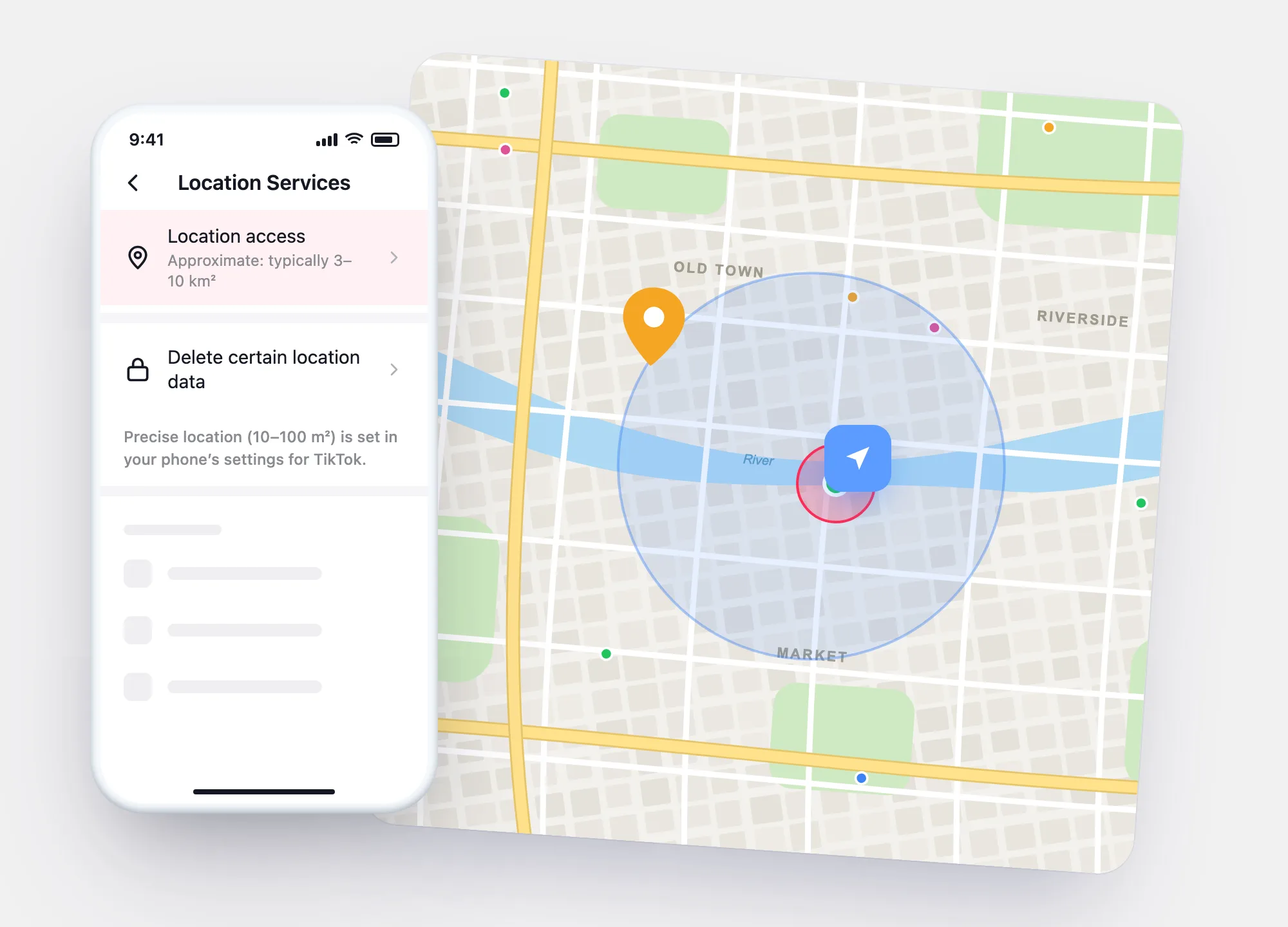
These come from TikTok’s Help Center article on location information. The picture shows them on one map: the widest ring is the estimate from SIM and IP, the cyan circle is approximate location, the small red circle is precise location, and the pin is a place tag on a post.

  • SIM region, IP address, device settings — used to estimate a general area even when Location Services are off.
  • Approximate location (Location Services on, 18+) — typically 3–10 km², about the size of a town or district.
  • Precise location (only if you allow it in your phone) — typically 10–100 m², using GPS, Bluetooth and Wi-Fi signals.
  • Location tag on a post — a place you choose; it is shown on the post to everyone who can see it.
Map diagram of TikTok location sources: a wide dashed region from SIM and IP, a cyan approximate-location circle, a small red precise-location circle and a yellow post-tag pin
From widest to sharpest: estimate from SIM and IP, approximate location (3–10 km²), precise location (10–100 m²), and a place tag you add to a post — the only one others see.

Visibility

Who can see each kind of location — and how to remove it

LocationWho can see itHow to turn it down
Place tag on a postOthers Everyone who can see that post.Don’t add a tag; delete or make private posts that show one.
Approximate locationTikTok Received from your device when Location Services are on.Settings and privacy → Privacy → Location Services → choose a permission; Delete certain location data.
Precise locationTikTok Only if precise location is allowed for TikTok on your phone.Turn off precise location for TikTok in your phone’s location settings.
Estimate from SIM and IPTikTok Works even with Location Services off.Can’t be switched off in the app; it is how internet services see a connection.
Login IP addressesYou In your own data download.Remove devices you don’t know in Security & permissions → Manage devices.

After you delete location data, TikTok says it may keep less specific information it already inferred, such as the city.

Your location picture

What your account shows about where you’ve been

Login networks

The networks your account logged in from

The report groups login IP addresses into ranges. Home Wi-Fi and mobile data usually make two or three; a range you can’t place, with a device you don’t know, is the one to act on.

See my networks →
Accuracy

Approximate is a district, precise is a building

TikTok’s Help Center: approximate location is typically 3–10 km² (1–4 sq mi); precise, when you allow it, about 10–100 m².

Settings

Turn it down in Location Services

Settings and privacy › Privacy › Location Services: choose the permission, then Delete certain location data.

Step by step →

Your login locations

The networks your TikTok account logged in from

Open your archive with the button at the top of the page. The report lists every login with its IP address and the network range it belongs to (for example 192.0.2.x), and flags a range the first time it appears. Your home Wi-Fi and your mobile data will show up as two or three ranges; a range you can’t place, together with an unknown device, is the one to act on.

No archive open yet

Your report will appear here. Try the sample — a made-up account with one login that isn’t the owner’s — or open your own file with the button at the top.

Location trackers for TikTok

What “TikTok location tracker” services claim, and what is really possible

Most results for this search promise someone else’s location. Here is what each promise depends on.

What the ad says

“Type a username and see their location on a map.”

What actually happens

TikTok shows other users a place only when the author tags it in a post. A service that draws a pin for any username is guessing — or showing the place tags already visible on that person’s posts.

What the ad says

“Send them a link and get their exact location.”

What actually happens

A link to an outside website can record the IP address of whoever opens it. An IP address points to an internet provider and a rough region, not a person’s position — and using it to find someone is not something to do. The protective side: don’t open links from people you don’t know.

What the ad says

“Install our tracker app to follow their TikTok location.”

What actually happens

That isn’t TikTok at all: it’s monitoring software installed on another person’s phone. Without that person’s knowledge it is stalkerware, and in many countries installing it is illegal.

What the ad says

“See which country a TikTok account is from.”

What actually happens

Your archive’s profile section includes an account region for your own account. TikTok’s Help Center doesn’t describe a way to see another account’s region.

Two-minute check

How much location are you sharing on TikTok?

Tick what’s true for you. Your answers stay in this browser.

Your result

Settings

Turn location sharing down in two screens

Open Profile → ☰ → Settings and privacy, then follow the marks. Precise location itself is switched off in your phone’s settings for the TikTok app.

1Privacy

In Settings and privacy, open Privacy.

2Location Services

Choose the location access permission for TikTok, then use Delete certain location data to remove what TikTok received from Location Services.

Location Services may not be available for TikTok in every region; where they aren’t, the menu may be missing.

Questions

TikTok location questions

Can someone track my location through TikTok?
Other users can see places you tag in posts and anything recognisable in your videos. TikTok’s Help Center doesn’t describe showing your Location Services data or IP address to other users.
Does TikTok know my location if Location Services are off?
Roughly. TikTok says it estimates an approximate location from your SIM region, IP address and device settings even when Location Services are off.
How accurate is TikTok’s location?
Approximate location is typically an area of 3–10 km² (1–4 sq mi); precise location, when allowed, is typically 10–100 m², according to TikTok’s Help Center.
Can I see where my TikTok was logged in?
Yes. Download your data in JSON, open it here, and the report lists each login with its IP address, device and network. IP addresses show a provider and region, not an exact place.
Is there a TikTok location tracker for another person’s account?
Not through TikTok. The only location others can see is a place tag added to a post. Apps that claim more either rely on those tags or on software installed on someone’s phone.
Open my report