Profile checkerNew

Recover a TikTok account without phone or email: ask two friends

When the reset code has nowhere to go, TikTok lets friends you’re connected with confirm it’s you. You need at least two of them, and they confirm from their own app.

Show the stepsOther options

Profile checkerNewcheck a TikTok profile by username

Friends verification

Recover your TikTok account with friends verification

From the TikTok login screen. Steps from TikTok’s Help Center.

1Help → Recover your account

Tap the Help button at the top, then Recover your account.

2Find the account

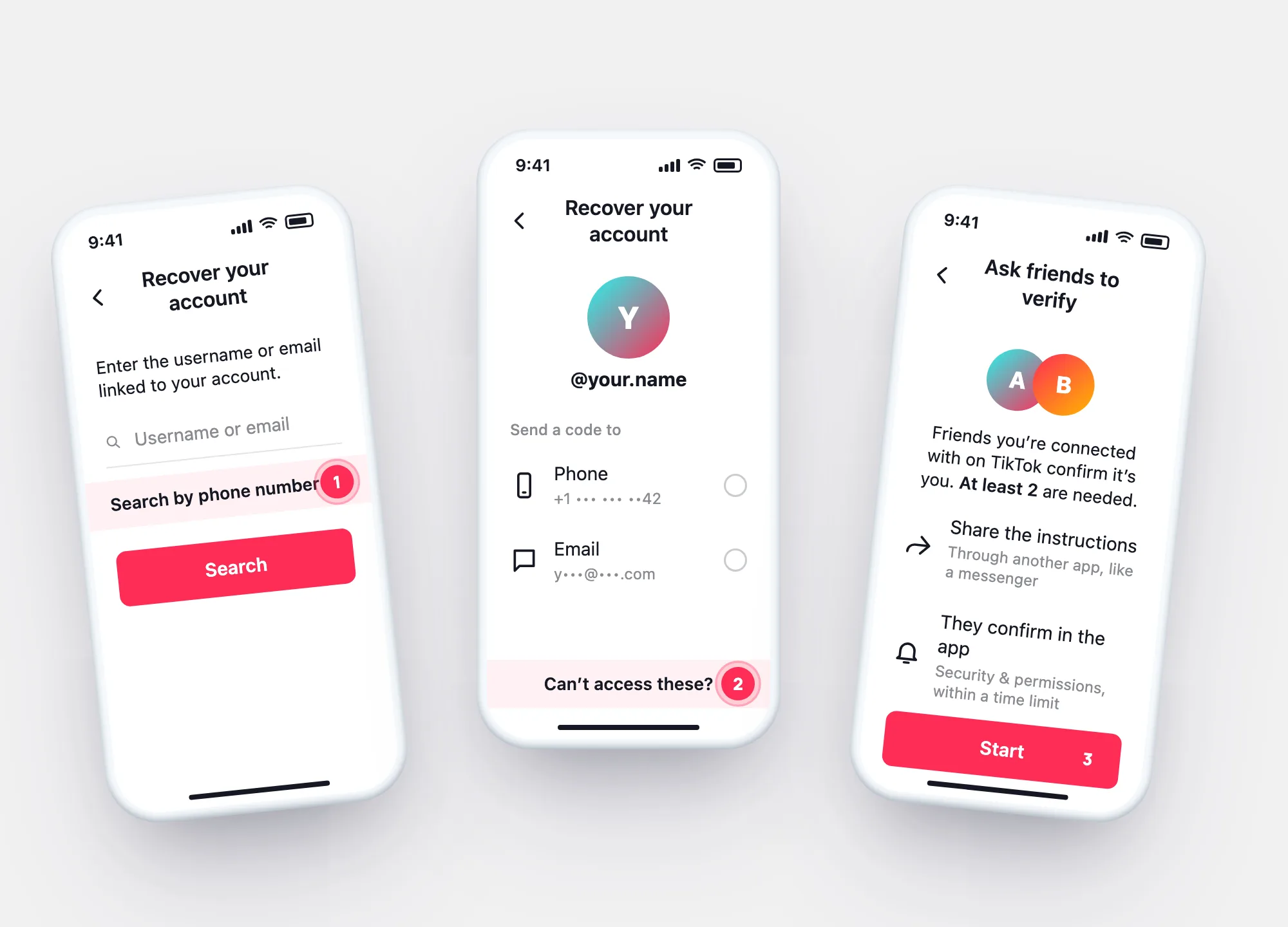
Enter the username or email, tap Search — or Search by phone number.

3Can’t access these?

At the bottom of the account page, then Ask friends to verify.

4Start → Share

Tap Start, then Share the instructions through another app.

How it works

What TikTok says about friends verification

  • At least 2 friends you’re connected with on TikTok.
  • They get the request in Security & permissions in their own settings — they may need the latest app version.
  • They have a limited time to confirm.
  • You can request it only a limited number of times a day.
  • Pass — you’re logged in automatically. Fail — try again or use another way.
Three screens: Recover your account search, the found account with Can't access these marked, and Ask friends to verify with Start
Search → Can’t access these? → Ask friends to verify. Two confirmations and you’re in.

Other ways

Before friends: what else you might still have

RouteWhere
The usernameFind the account by username in TikTok’s own recoveryHelp → Recover your account
A Google, Apple or Facebook loginSign in with the same button you signed up withSigning in with another account
A device still logged inAdd a new phone or email right nowAccount → Account Information
The authenticator appUse it if 2-step verification is onLost 2-step verification
None, and no two friendsTikTok’s Help Center describes no other route—

Every route goes through something tied to the account. That’s what stops strangers from using the same routes on it.

Recovery services

“TikTok account recovery with username” services

Searches like recover TikTok without email lead to paid “recovery” offers.

What the ad says

“Recover any TikTok account with just the username.”

What actually happens

Searching by username is a step in TikTok’s own recovery — free, in the app. It finds the account; it doesn’t open it without a code or friends.

What the ad says

“Our agent will recover it for you.”

What actually happens

The routes TikTok describes run in your app, with your contacts or your friends. A third party asking for payment or your login is a common scam pattern.

Once you’re back

Make sure it doesn’t happen again

Two contacts

Link a phone and an email

TikTok recommends both — if one is lost, the other still gets the code. Account → Account Information.

Friends

Know who could vouch for you

Friends verification needs at least two friends you’re connected with on TikTok.

Look back

Who was signed in while you were out

Your data archive’s login history shows every device and network that logged in. TkSpy reads it on your device.

Open my login history →

Questions

Questions about recovering without phone or email

Can I recover TikTok with just my username?
The username finds the account in Recover your account. To get in, you still need a linked phone or email, a linked login, or friends verification.
How many friends do I need?
At least two you’re connected with on TikTok.
My friends don’t see the request.
It appears in Security & permissions in their settings; TikTok notes they may need to update the app.
What if I don’t have two friends on TikTok?
TikTok’s Help Center describes no other route without a linked contact or login. No outside service can open one for you.
Open my report