Lost your TikTok 2-step verification method? The way back
If one method is gone, the second one you chose still works. If it was the authenticator app, TikTok has a recovery code for exactly this — and an identity check if that’s lost too.
Profile checkerNewcheck a TikTok profile by usernameWhat’s gone
What did you lose?
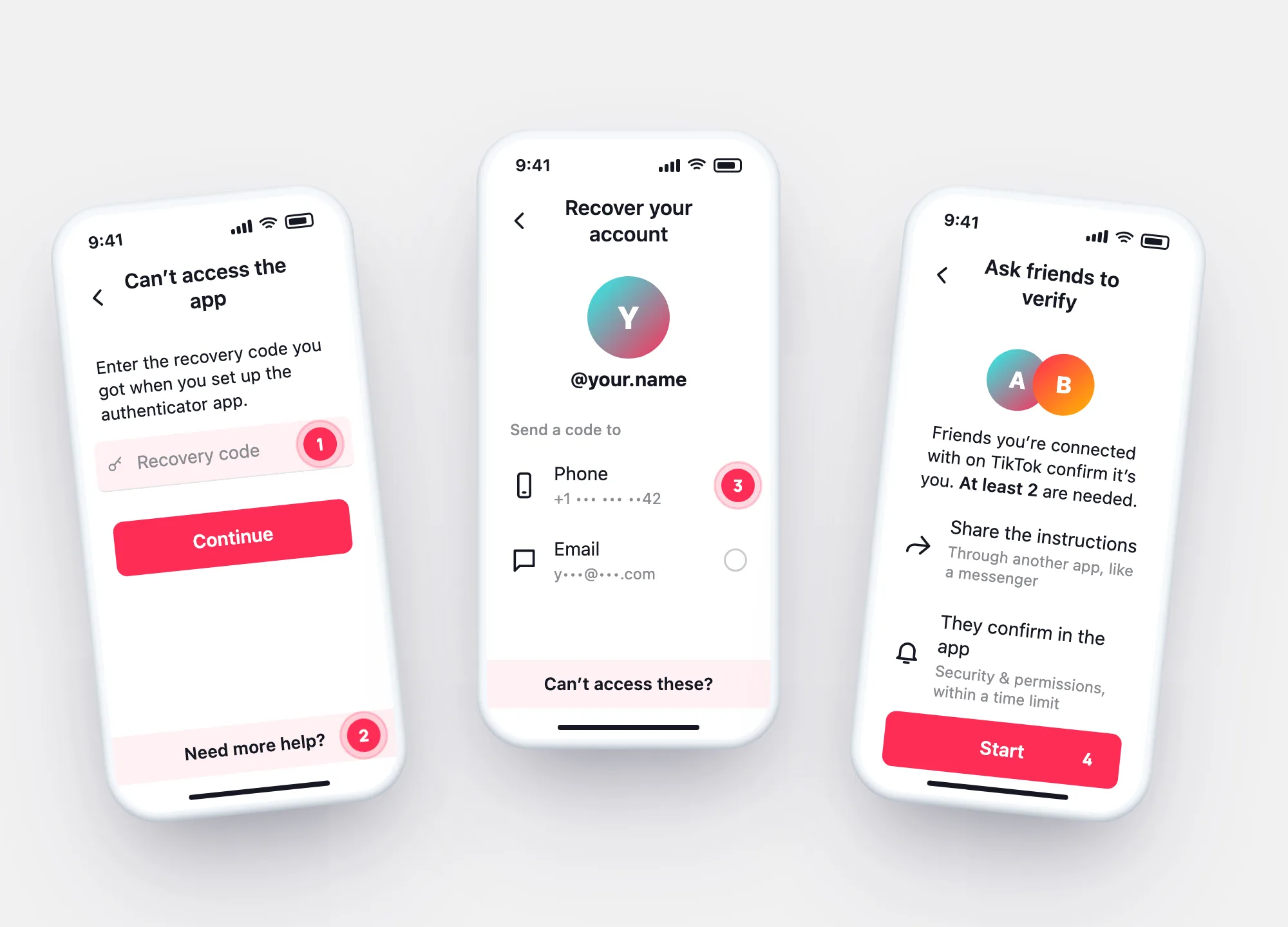
In the TikTok app tap Can’t access the app and enter the recovery code you got when you set up the authenticator (a time-based one-time password, TOTP).
If it’s right, you’ll land on the settings page to reset your authentication method.
Show the screensTap Need more help? and fill in the details TikTok asks for to confirm it’s you. After that you can reset the method.
TikTok says this may take up to 30 days.
Use your second method — email or authenticator. Once in, link a new number in Account → Account Information.
If no method you chose still works, TikTok’s route is verification by at least two friends you’re connected with.
Friends verificationLost authenticator
Reset the authenticator method
Enter the code saved during setup. Correct → settings page → reset the method.
Fill in the identity details. TikTok says this can take up to 30 days.
In one picture
Three ways back, from fastest to slowest
Which one applies depends on what you set up before. That’s why TikTok asks for two methods — and why the recovery code is worth keeping somewhere other than the phone.
- Second method — phone, email or authenticator you also chose.
- Recovery code — resets a lost authenticator.
- Identity check or friends — when nothing else is left.
What still works
If you lose one thing, what still gets you in
| What still works | Where | |
|---|---|---|
| Lost the phone (number kept) | SMS codes go to the number — a new phone with your SIM receives them | Put the SIM in the new phone |
| Lost the number | Email or authenticator, if you chose them | Then Account → Account Information |
| Lost the authenticator | Recovery code, or Need more help | Can’t access the app |
| Lost every method | At least two friends verify | Help → Recover your account → Can’t access these? |
Bypass offers
“2FA bypass” and recovery services
“We remove TikTok 2-step verification.”
The only routes TikTok describes are in the app: the recovery code, the identity check and friends verification. An outside service can’t use them for you.
“Send us your recovery code.”
The recovery code resets your authenticator — whoever has it can take over that step. Keep it to yourself.
Questions